Best Budgeting Apps for Couples (Plus Free, Beginner & Mint-Replacement Picks)
My partner and I tried three different budgeting apps together before one actually stuck. The first one, we quietly stopped opening after about six weeks. The second one caused an argument over a $40 “miscellaneous” category (don’t ask). The third one is still open on both our phones right now, and honestly, that’s the real test of whether a budgeting app for couples is any good — not the feature list, but whether you’re both still using it a few months in.
So this isn’t a generic “top 10 apps” list pulled from a press release. It’s what I’ve personally tested, combined with what consistently shows up across trusted sources and communities — and I’ll be upfront about something important: this whole category got shaken up when Intuit shut Mint down in early 2024, and honestly, budgeting apps change their pricing and features often enough that I’d treat anything you read here (including this post) as a starting point, not gospel. Always double-check current pricing directly on the app’s site before you commit.
Let’s get into it — starting with the couples angle, since that’s what most of you are here for, then covering free options, beginner picks, college-student picks, and the ongoing search for a real Mint replacement.
The Two Types of Budgeting Apps (Know This Before You Pick One)
Before I get into specific apps, there’s one distinction that saved me a lot of frustration once I understood it: budgeting apps generally fall into two camps, and picking the wrong camp for your personality is the number one reason couples give up on an app within a month.
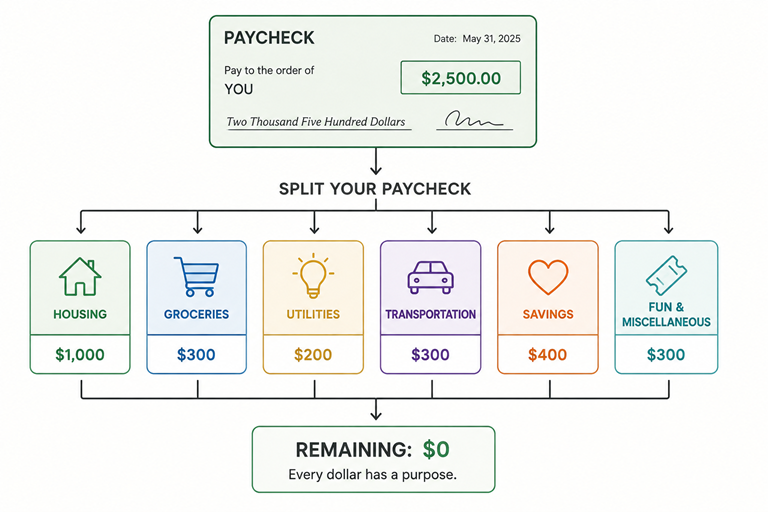
Zero-based budgeting apps — think YNAB, EveryDollar, Actual Budget — require you to actively assign every dollar to a category before you spend it. They’re more hands-on, but they’re genuinely better at changing spending behavior, because there’s no unassigned money to accidentally blow. If you want to go deeper on how this method works, I’ve written a full breakdown here: loonnews.com/why-zero-based-budgeting-is-the-best-method.
Tracking/dashboard apps — think Monarch, Copilot, Rocket Money — automatically pull and sort your transactions after the fact and layer a budget on top. Lower effort, less friction, better for people who want visibility without a lot of manual data entry.
Here’s the thing most “best budgeting apps” listicles get wrong: they rank everything like there’s one universal winner. There isn’t. A couple who loves detailed, hands-on budgeting and a couple who just wants a shared dashboard showing where the money went are looking for two completely different tools. Figure out which camp you and your partner actually belong in before you compare feature lists.
Best Budgeting Apps for Couples
This is the heart of what you came here for, so let’s get specific.
What Actually Makes a Budgeting App Good for Couples
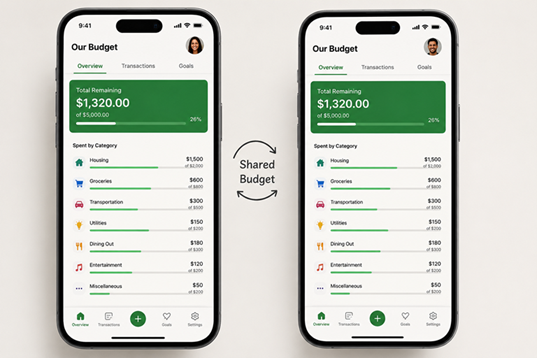
A few things matter here that don’t come up in solo-budgeting reviews. You both need real-time shared visibility into the same numbers — not screenshots texted back and forth, which is honestly how my partner and I did it for way too long before switching to an app. You need support for however you actually structure your money, whether that’s fully joint, fully separate with split bills, or the “yours/mine/ours” hybrid that a lot of modern couples land on. You need separate logins, not one partner “owning” the account while the other just peeks over a shoulder. And ideally, the app should reduce money friction, not create it — which is a softer factor, but it matters more than it sounds like it should.
Honeydue — Best for Couples Who Keep Some Accounts Separate
Honeydue comes up more than any other app when “budgeting app for couples” is the actual search intent, and after using it myself for a stretch, I get why. It’s built specifically around the “yours/mine/ours” reality — you can link only some accounts to shared visibility while keeping others private, which was genuinely useful for us since we split bills from a joint account but each keep separate personal spending money.
The feature I liked most, and one that gets mentioned constantly in reviews, is being able to comment directly on a transaction inside the app — like asking “what was this for?” without it turning into a whole separate text conversation that can feel like an interrogation. It also has bill reminders built in, and it has a free tier, which matters if you’re trying to avoid adding another subscription to your monthly expenses.
Monarch Money — Best for Couples Who Want Full-Featured Budgeting Together
If Honeydue is the lightweight, “just show us what’s happening” option, Monarch Money is the premium pick for couples who want real budgeting depth, not just shared visibility. It supports multiple logins tied to one household account, shared savings goals (great if you’re both saving toward something like a house down payment — more on goal-based saving here: loonnews.com/how-to-save-money-fast-for-a-house), and net-worth tracking.
The trade-off is cost — there’s no permanently free tier, just a trial before the subscription kicks in. If you’re the kind of couple that wants Mint’s old automatic-tracking style but built for two people from the ground up, this is usually the top recommendation.
Goodbudget — Best Free Option for Couples
Goodbudget is the modern digital version of the old cash-envelope system, and it’s a genuinely strong pick for couples on a tighter budget who still want joint, zero-based-style control without paying for it. Both partners can access the same set of digital envelopes across separate devices in real time, which is honestly a pretty elegant solution to a problem physical cash envelopes never solved — you can’t both carry the same envelope around.
YNAB — Best for Couples Fully Committed to Zero-Based Budgeting
YNAB supports multiple users on one shared budget file, and it’s repeatedly recommended for couples who are both genuinely willing to sit down and engage with the zero-based method together. That “both” is doing a lot of work in that sentence, though — YNAB’s whole effectiveness depends on both people actually participating, and it’s a rougher fit if only one partner wants to be hands-on with the budget. I’d say this one’s worth it only if you’re both bought in, not if you’re hoping the app will convert a reluctant partner on its own.
EveryDollar — Best for Couples Doing Debt Payoff Together
If you and your partner are working through debt as a shared goal, EveryDollar (from Ramsey Solutions) is built to pair with the whole debt-snowball, baby-steps framework — a lot of the surrounding content (trackers, milestones) is explicitly designed to be a joint journey rather than a solo one. If debt payoff is your main shared goal right now, this is worth a look specifically for that reason.
The “Merge or Stay Separate” Question Couples Are Really Asking
Here’s something I noticed while researching apps with my partner — we weren’t just picking software, we were implicitly deciding how to structure our finances as a couple. That’s a bigger question than any app answers by itself, so it’s worth thinking through directly.
Fully joint accounts build a strong sense of shared purpose and simplify budgeting into one single view, but they remove individual financial autonomy, and I’ve seen (and briefly experienced) the friction that can cause over discretionary spending. Fully separate accounts with proportional bill-splitting preserve independence and avoid a lot of value clashes over spending habits, but they complicate joint goal-setting and require more manual coordination — something to think about if you’re saving toward something big together.
The hybrid “yours/mine/ours” model is what most modern couples’ content lands on as the middle ground, and it’s what we personally settled on: a shared account for bills and joint goals, with each person keeping a separate account for their own discretionary spending. It’s exactly why an app like Honeydue, built around partial account linking, is recommended so often — it’s designed to actually support this hybrid structure instead of forcing an all-or-nothing merge.
Best Budgeting Apps Overall (2026 Comparison)
Stepping back from the couples-specific angle, here’s how the broader “best budgeting apps” category consistently breaks down. I’ve laid it out as a comparison table because, honestly, that’s the fastest way to actually compare these against each other instead of reading five paragraphs each.
| Category | Most-Cited Pick(s) | Why |
|---|---|---|
| Best overall / most full-featured | YNAB, Monarch Money | Deepest feature sets, active development, strong community |
| Best free option | Goodbudget (free tier), Rocket Money (free tier) | Genuinely usable without paying, though with limits |
| Best for couples | Honeydue, Monarch Money | Built-in shared visibility and collaboration |
| Best for beginners | PocketGuard | Simple “safe to spend” number instead of a full ledger |
| Best for debt payoff | EveryDollar, YNAB | Zero-based structure pairs naturally with aggressive payoff |
| Best for net-worth tracking | Empower Personal Dashboard | Strong investment integration, thinner budgeting tools |
| Best Mint replacement | Monarch Money | Closest in feel to Mint’s automatic-tracking approach |
| Best for privacy/no subscription | Actual Budget | Open-source, self-hostable |
| Best for bill/subscription management | Rocket Money | Built-in cancellation and negotiation tools |
Quick note on pricing: I’m intentionally not quoting exact numbers here, because subscription pricing in this space changes often enough that anything I write today could be outdated by the time you read it. Check each app’s official pricing page directly before deciding — it’s a two-minute step that avoids an unpleasant surprise on your card statement.
Best Budgeting Apps Free (Genuinely Free, Not Just Free Trial)
A lot of “free” budgeting apps are really just apps with a free trial before the subscription kicks in, so it’s worth being specific about which ones are actually free to use long-term, even with some limits.
Goodbudget’s free tier is a solid pick, with limits on how many envelopes you can create before it nudges you toward the paid version. Rocket Money’s free tier covers core transaction tracking, with bill negotiation and some premium tools sitting behind a paid add-on. PocketGuard also has a genuinely usable free tier, with a paid “Plus” upgrade if you want more linked accounts or deeper features.
None of these fully replicate what Mint offered for free — and that’s a real, repeated frustration across forums, since Mint’s free model worked because it made money by recommending financial products to users, a model most newer apps haven’t recreated. If you’re specifically trying to avoid any subscription cost, one of these three free tiers, possibly combined with a simple spreadsheet for anything the app doesn’t cover, is the realistic path — not a single perfect free app that does everything.
Best Budgeting Apps for Beginners (2026)
If you’ve genuinely never budgeted before, the criteria shift a bit — you want simple setup, minimal manual entry, and clear visual feedback over deep customization.
PocketGuard is the app I’d point a true beginner toward first, mostly because of its “In My Pocket” number — a single figure showing what’s actually safe to spend after your bills, goals, and savings are accounted for. That one number is a lot easier to act on than a full category-by-category ledger when you’re just starting out.
Rocket Money works well for beginners too, partly because its automatic tracking requires almost no setup, and it tends to give new users an early motivating win by surfacing forgotten subscriptions you can cancel immediately — a small, fast success that builds momentum.
EveryDollar is worth mentioning specifically for beginners interested in the Ramsey baby-steps framework, since it comes with a whole documented step-by-step system attached, not just an app — useful if you want a roadmap, not just a tool.
One honest note: YNAB and Monarch, despite being excellent apps, are frequently flagged in more candid reviews as not ideal first apps. YNAB’s zero-based method and detailed category system are genuinely more rewarding after you’ve put in some onboarding effort — which is exactly why beginner-specific lists tend to rank it lower than general “best of” lists do, often describing it as “best for beginners willing to learn the system” rather than “easiest.”
Best Budgeting Apps for College Students
College budgeting has its own set of priorities — cost has to be low or free, and the app needs to handle irregular income well, since part-time jobs and lump-sum financial aid deposits don’t look like a stable monthly paycheck.
Rocket Money’s free tier gets recommended a lot here specifically because it catches subscription creep, which is a genuinely common student money leak — streaming services and app subscriptions piling up unnoticed. PocketGuard’s free tier works for the same reason it works for beginners generally, with its “safe to spend” number being especially handy for managing money that arrives irregularly. Goodbudget’s free tier is another solid pick for students who want to build strong habits around discretionary categories like dining out and entertainment using the envelope method, without paying anything.
Here’s something worth saying plainly, though: if your finances are genuinely simple right now — one checking account, no investments, a handful of bills — you might not need a dedicated app at all. A free spreadsheet template or your bank’s own built-in spending categorization might be completely good enough. I know that’s not the exciting answer, but it’s the honest one, and it’s echoed across a lot of student-focused financial content.
One thing budgeting apps generally don’t handle well is roommate bill-splitting — if you’re sharing rent or utilities with roommates, you’ll likely need a separate bill-splitting app alongside your budgeting app rather than expecting one tool to do both.
Best Budgeting Apps to Replace Mint (2026)
If you’re here because Mint shut down and you never really found a replacement you liked, you’re far from alone — this is one of the most persistent search categories in personal finance content, and it’s been active since Intuit folded Mint’s features into Credit Karma back in early 2024. For more background on that shutdown directly from Intuit, you can check their official statement here: Intuit’s Mint transition announcement.
Monarch Money is the app most consistently named as the closest direct successor — it’s frequently noted for mirroring Mint’s automatic-categorization, dashboard-style approach while adding collaborative features Mint never had. The main objection people raise is the lack of a permanently free tier, which is a real adjustment if you’re used to a free tool.
Rocket Money is usually the top pick if you specifically want a free-tier option, with the bonus of subscription cancellation and bill negotiation tools, though its free version is generally more limited than Mint’s was. Empower Personal Dashboard is worth a look if your main use for Mint was net-worth and investment tracking rather than detailed category budgeting — its budgeting tools are thinner, but its investment tracking is strong. Simplifi by Quicken sits as a lower-cost paid middle ground between Mint’s old simplicity and YNAB’s more demanding method.
A common frustration worth flagging honestly: none of these apps offer a clean, automatic import of years of old Mint transaction history. Most people end up starting fresh or manually exporting and importing CSV data, which is a genuinely annoying step but not one any current app has solved well.
So, Which One Should You Actually Pick?
If you’re a couple who keeps some finances separate, start with Honeydue. If you want a full-featured, Mint-like experience built for two people and don’t mind paying for it, go with Monarch Money. If you’re on a tight budget together, Goodbudget’s free envelope system is hard to beat. If you’re both fully committed to zero-based budgeting, YNAB is worth the learning curve. And if you’re a beginner, a student, or just want the simplest possible starting point, PocketGuard’s “safe to spend” number is genuinely the easiest place to start.
Whatever you pick, the honest truth — from someone who’s cycled through three of these with a partner — is that the “best” app is the one you’re both still opening a few months from now. Feature lists matter less than that.