How to Track Forgotten Subscriptions In About 30 Minutes
I found out I was paying for two different meditation apps at the same time. Not one I’d forgotten about and one I used — two, both active, both charging me monthly, and I genuinely could not tell you why I ever signed up for the second one. That discovery is what sent me down the rabbit hole of figuring out how to track forgotten subscriptions properly, instead of just vaguely feeling like “I probably have a few I don’t use.”
Turns out I wasn’t even close to alone in this. The average person drastically underestimates what they’re actually spending on recurring charges every month — streaming, cloud storage, random software tools, fitness apps, free trials that quietly turned into real charges. It adds up to hundreds, sometimes thousands, of dollars a year, leaking out in amounts too small to individually notice.
So I built myself a system — a real, repeatable process to audit monthly recurring expenses and cut unnecessary monthly subscriptions without spending an entire weekend doing it. It takes about 30 minutes, start to finish, and I still run a shorter version of it every few months. Here’s exactly how it works.
Why We All Have More Forgotten Subscriptions Than We Think
Before I walk you through the audit itself, I think it’s worth understanding why this happens to basically everyone, because once I understood the mechanics, I stopped feeling embarrassed about my double meditation app situation.
Individual subscription fees are designed, whether intentionally or not, to slip right past your mental spending alarms. A $10-a-month charge feels like nothing in isolation. But stack a dozen of those “nothing” charges together and you’re looking at over $1,400 a year, disappearing in pieces small enough that no single one ever feels worth questioning. There’s actually a term for this — price masking — and it’s exactly why a subscription audit feels so much more revealing than you’d expect going in.
Free trials make this worse. Nearly half of consumers end up getting automatically converted from a free trial into a paid subscription, and that’s not really an accident. Signing up takes one click; canceling often requires navigating a maze of menus, hidden links, or, in some genuinely infuriating cases, a mandatory phone call during narrow business hours. These are sometimes called “dark patterns,” and they’re specifically designed to make quitting harder than joining. On top of all that, the sheer number of AI tools, niche productivity apps, and premium upgrades available now means your digital footprint of small charges is scattered across way more payment processors than it used to be.
Phase 1: The Multi-Channel Hunt (First 15 Minutes)
Here’s the mistake I made the first time I tried this: I only checked my main checking account. That’s not enough. Subscriptions hide across several different touchpoints, and if you only check one, you’ll miss a meaningful chunk of them. I think of this as a sweep across four pillars, and I genuinely go through all four every time now.
Pillar 1: Bank and Credit Card Statements
Pull the last three months of your checking account and credit card statements to catch the standard monthly stuff. But don’t stop there — pull a full 12 months too, specifically to catch sneaky annual renewals like software licenses, Amazon Prime, or domain registrations, which are exactly the kind of charge a shorter lookback window will miss entirely.
Sort or filter by merchant name and look for repeated line items with identical dollar amounts landing on the same day each month. Pay close attention to unfamiliar billing descriptors — a lot of subscriptions bill under a parent company name that looks nothing like the actual app or service you signed up for, which is exactly how so many of these slip past a casual glance.
Pillar 2: Mobile App Store Ecosystems
This is the one people forget most often, and it was actually where I found that second meditation app. Apple and Google both act as billing intermediaries for a huge number of subscriptions, meaning a charge might never even show up clearly on your bank statement as anything other than “Apple” or “Google.”
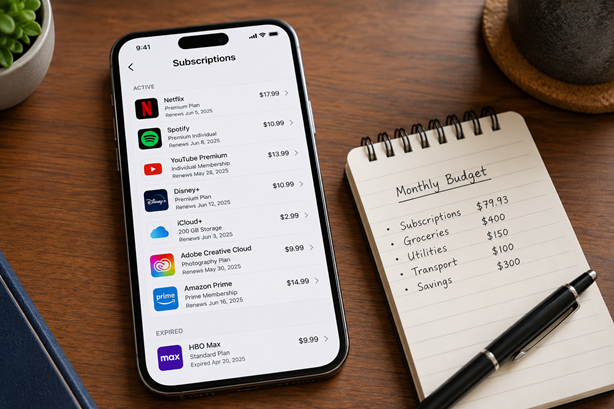
On iOS, open Settings, tap your name at the top, select Subscriptions, and review both your active and expired listings. On Android, open the Google Play Store, tap your profile icon, choose Payments & subscriptions, then Subscriptions. Both take about two minutes and both are genuinely worth doing.
Pillar 3: Digital Wallets and Fintech Apps
Subscriptions frequently route around your credit card entirely through third-party platforms, which is another reason a single-statement check isn’t enough. Check PayPal and Venmo’s pre-approved payments and automatic billing settings. If you use buy-now-pay-later services like Klarna, or regional autopay frameworks, check those too for dormant installments or memberships you’d otherwise never see.
Pillar 4: Inbox Forensics
Your email inbox is basically a paper trail of every subscription you’ve ever signed up for, even the ones you’ve forgotten completely. Search using a few targeted phrases: “Welcome to your free trial,” “Your subscription will renew,” “Payment confirmation” or “Invoice from,” and “Auto-renewal notice” or “Thank you for subscribing.” I found three separate free trials I’d never actually canceled just from this one search — none of which had shown up clearly on my bank statement yet, since they hadn’t converted to paid charges when I ran the audit.
Phase 2: Categorize, Triage, and Evaluate (Next 10 Minutes)
Once you’ve swept all four pillars, you’ll have a raw list — mine the first time was honestly longer than I expected, even after years of considering myself pretty financially organized. Drop everything into a spreadsheet or even just a notes app, then run each item through the same five questions.
Ask yourself: have you actually used this in the last 30 days? Could you get the same value somewhere else for free or cheaper? Are you paying for who you hope to become — the unused language app, the gym membership, the coding course you haven’t opened — rather than who you actually are right now? Does it duplicate something you’re already paying for, like cloud storage bundled into your phone plan sitting alongside a separate paid Dropbox account? And honestly, if this service vanished tomorrow, would you actually notice, or care enough to go resubscribe at full price?
That last question is the one that got me. There’s something clarifying about picturing a service just disappearing and asking whether you’d actually chase it down. If the honest answer is “meh, probably not,” that’s your answer.
The Streaming Rotation Trick
One tactic I picked up from consumer finance communities and now genuinely use: instead of keeping four or five streaming subscriptions running simultaneously year-round, rotate through them one at a time. Subscribe to one platform, binge through what you actually want to watch, cancel it, then move to the next one when something new drops. It keeps your entertainment spending intentional instead of passive, and it’s saved me a real amount over the past year without cutting streaming out of my life entirely.
If you want a deeper look at streaming and subscription bundling more broadly as part of a full monthly budget, I’ve covered that here: loonnews.com/how-to-stop-overspending.
Phase 3: Execution and Defense (Final 5–10 Minutes)
This is the part where the actual savings lock in, and it’s also the part people tend to procrastinate on, so I’d push you to just push through it in one sitting rather than leaving it as a “someday” task.
Cancel Now, Not Later
Every day you delay a cancellation is a day closer to a new billing cycle triggering. Don’t sit on the list you just built — go through it and cancel what didn’t survive the five questions above, right then. Take a full-screen screenshot of every cancellation confirmation page, or save the confirmation email, so you’ve got proof on hand if an accidental charge shows up after the fact — this has genuinely saved me from a billing dispute before.
For anything annual you’ve decided to keep, set a calendar reminder exactly seven days before the renewal date. That gives you a real window to reconsider and cancel before the money actually leaves your account, instead of realizing a year later that you never meant to renew.
Tools That Make This Easier
If a spreadsheet feels like too much manual work, there’s a solid ecosystem of tools built specifically to audit monthly recurring expenses for you. Aggregators like Rocket Money or Trim scan your linked accounts and surface recurring charges automatically, while lighter apps like Bobby or PocketGuard track renewal schedules and notify you before a payment hits. For a broader comparison of budgeting and expense-tracking apps generally, I’ve written a full breakdown here: loonnews.com/best-budgeting-apps-for-couples.
There’s also a newer wave of privacy-first, community-built tools worth knowing about — some open-source or local browser utilities let you upload an anonymized bank statement CSV and scan it locally in-browser, without handing your actual bank login credentials over to a third party. Tools like these have popped up on developer forums like Reddit, built by people solving their own version of this exact problem — which is honestly a reassuring sign that this is a widely shared frustration, not something only you’re bad at managing.
Building Permanent Defenses So This Doesn’t Happen Again
Finding forgotten subscriptions once is useful. Making sure they don’t quietly pile back up is the part that actually protects your bank account long-term. A few structural habits made this stick for me.
Designate one single credit card exclusively for recurring subscriptions and digital bills. This one change alone made my next audit take about five minutes instead of thirty, because everything recurring was already isolated in one place, separate from my regular checking account and day-to-day spending.
If your bank offers virtual disposable cards, use them specifically for free trials. You set a spending limit or an auto-expiring timeline, and if you forget to cancel before the trial ends, the card simply declines the charge instead of silently converting into a real bill. It’s the single best defense against the “I meant to cancel that” problem I’ve found.
And finally, put a recurring reminder on your calendar every 90 days to run a condensed, ten-minute version of this whole audit. You don’t need to redo the full 30-minute sweep every time — once your subscriptions are consolidated onto one card and your inbox has been cleaned out once, a quarterly check is genuinely enough to catch anything new before it becomes another forgotten charge.
What I Actually Found (And What You Probably Will Too)
Beyond the double meditation app, my first real audit turned up a cloud storage plan I’d upgraded during a work project two years earlier and never downgraded, a recipe app subscription I signed up for during a specific cooking phase that had long since passed, and a “premium” version of an app whose free tier honestly did everything I needed. None of these were dramatic individually. Together, canceling them freed up around $40 a month — not life-changing, but not nothing either, and it took less time than making dinner.
If you’re also working on tightening up your broader monthly budget, not just subscriptions specifically, this pairs really well with building out a full spending plan — I’ve walked through that process in detail here: loonnews.com/how-to-save-money-fast.
Quick Answers to Common Questions
How do I find subscriptions I forgot I have? Run the four-pillar sweep — bank and credit card statements (both 3-month and 12-month lookbacks), your phone’s app store subscription settings, digital wallets and fintech apps like PayPal, and an email search for phrases like “your subscription will renew” or “welcome to your free trial.” Checking only one of these will almost always miss something.
How often should I audit my recurring expenses? Do the full 30-minute sweep once to get a clean baseline, then a condensed 10-minute version every 90 days is generally enough to catch anything new before it quietly becomes a forgotten charge.
What’s the fastest way to cut unnecessary monthly subscriptions without overthinking it? Run every item through the five-question filter — used in the last 30 days, replaceable for free or cheaper, aspirational rather than actually useful, duplicating something else you pay for, and whether you’d actually miss it if it vanished tomorrow. If it fails two or more of those, cancel it.
Is it worth using a subscription tracking app instead of doing this manually? If you’d rather not repeat the manual sweep every quarter, an aggregator tool that scans your linked accounts can save time going forward — though the first manual audit is still worth doing yourself at least once, since it also walks you through your app store and inbox, which most tracking apps don’t fully cover.
Go Do This Today, Not Someday
Here’s my honest closing thought: this genuinely takes about half an hour, and most people who put it off imagine it’ll take way longer than it actually does. Set a timer, work through the four pillars, run your list through the five questions, cancel what doesn’t earn its place, and set up one card specifically for recurring bills so this doesn’t quietly build back up. I promise you’ll find at least one thing you completely forgot you were paying for — almost everyone does.